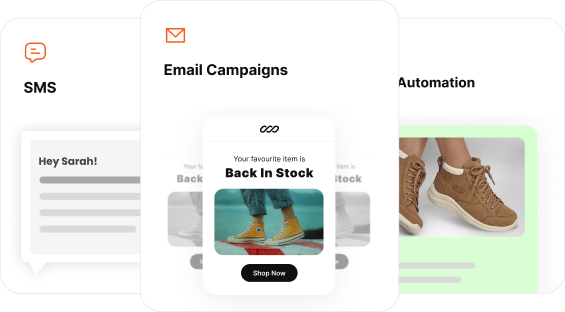
If you aren’t using a high-performance WordPress popup plugin, you are likely losing up to 15% of your departing visitors forever.
Most site owners avoid popups because they fear “annoying” their audience or slowing down their site.
Even worse, many waste hours on clunky plugins that fail to trigger at the right moment, resulting in zero leads and a high bounce rate.
You don’t need more popups; you need smarter triggers and better timing.
In this article, we’ve curated a list of the 10 best WordPress popup plugins, including free plugins that are tested for:
- Speed
- Mobile responsiveness
- Triggering popups at the right time.
We’ve covered:
- How to select the WordPress popup plugin that suits your business?
- A comparison chart of the 10 best WordPress popup plugins and a detailed breakdown
- How to add a high-converting WordPress popup in under 5 minutes?
- How to create WordPress popups without plugins?
- The Do’s and Don’ts of WordPress popups, featuring a real-world example of AeroPress and how they use WordPress popups.
Capture email addresses at strategic times using Retainful’s advanced triggers like exit intent, scroll depth, time spent, and more.
How to select the WordPress popup plugin that suits your business?
- Define your primary goal:
- E-commerce: Look for “Add-to-Cart” triggers and automatic coupon generation (e.g., Retainful).
- Lead generation: Prioritize advanced targeting and exit-intent to capture emails.
- Simplicity: Choose a plugin with a wide variety of pre-made templates so you don’t have to design from scratch.
- Check trigger variety: Ensure the plugin offers the specific triggers you need, such as Exit-Intent, Scroll Depth (e.g., 50% of the page), or Time Delay (e.g., 10 seconds).
- Prioritize performance (Speed): Avoid heavy plugins that bloat your code. Look for “Speed-Optimized” or “Lightweight” descriptions to protect your SEO and Core Web Vitals.
- Mobile responsiveness: Since over 60% of traffic is mobile, verify that the plugin allows you to create mobile-specific popups or “teaser” bars that won’t get penalized by Google.
- Integration compatibility: Make sure the plugin connects natively with your existing tools, such as your Email Service Provider (ESP).
- Budget vs. scale:
- Startups: Look for “Freemium” models that allow unlimited impressions but limit advanced features.
- Established brands: Invest in a Pro version for features like Geo-targeting and AdBlock detection.
Design attention-grabbing popups effortlessly using Retainful’s pre-designed templates and drag-and-drop editor.
10 Best WordPress popup plugins comparison chart (Free tools included)
| WordPress popup plugin | WordPress rating | Best popup feature | Free Plan | Starting Price |
| Retainful | ⭐ 4.8/5 | Smart popups with over 10 types of triggers, including exit intent and add to cart popups. | ✅ | $14/mo |
| OptinMonster | ⭐ 4.5/5 | Exit-Intent technology | ❌ | $9/mo |
| Popup Maker | ⭐ 4.9/5 | Unlimited Free Popups with Scroll Triggers | ✅ | $87/yr |
| Elementor Pro | ⭐ 4.7/5 | Design freedom (Visual canvas Popup builder) | ❌ | $59/yr |
| Thrive Leads | ⭐ 4.6/5 | SmartLinks (Hide popups from subscribers) | ❌ | $99/yr |
| Omnisend | ⭐ 4.9/5 | Multi-step wheel of fortune | ✅ | $16/mo |
| Convert Pro | ⭐ 4.8/5 | Click-to-popup & speed-optimized Code | ❌ | $89/yr |
| Hustle | ⭐ 4.4/5 | AdBlock detection & social share popups | ✅ | $3/mo |
| WP Popups | ⭐ 4.8/5 | Geolocation targeting for local offers | ✅ | $49/yr |
| Icegram | ⭐ 4.6/5 | Action bars & toast notifications | ✅ | $97/yr |
Complete analysis of the 10 best WordPress plugins
1. Retainful
Retainful is a specialized e-commerce marketing engine for WordPress/WooCommerce that blends popups with automation.
It turns departing traffic into repeat purchases.
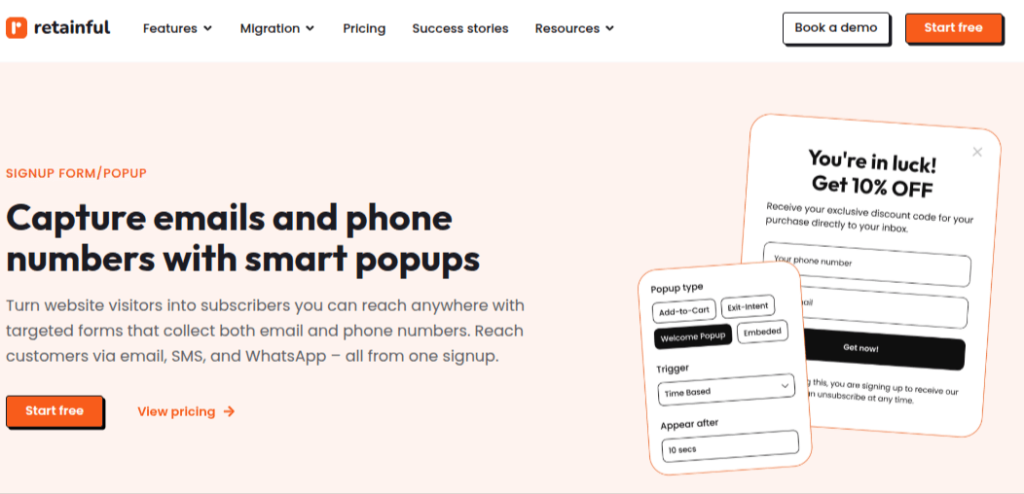
Key popup features (E-commerce Focused):
- Add-to-Cart Triggers: Triggers a popup the moment a user clicks “Add to Cart,” capturing their email address immediately. So you can recover the cart even if they never reach the checkout page.
- Next-Order Coupon Automation: Automatically generates and displays a unique, single-use coupon code within the popup to incentivize immediate or future purchases.
- Smart Exit-Intent popup: Tracks mouse movement to detect when a visitor is about to close the tab, firing a last-minute “save the sale” offer.
- Scroll & Time-Based Triggers: Precision timing that shows popups only after a user is engaged (e.g., spent 30 seconds on site or scrolled 60% of a product page).
- Page-level targeting: Allows you to show different popups for specific product categories, tags, or high-value landing pages.
- Geographical targeting: Location-based targeting for displaying local offers.
Bonus features (Non-popup utilities):
- Automated email workflows: A full suite of pre-built “Set-and-Forget” flows for Abandoned Cart recovery, Welcome series, and Win-back campaigns.
- Omnichannel reach (SMS & WhatsApp): Goes beyond email by allowing you to send recovery reminders and coupons via text and WhatsApp messages from the same dashboard.
- Actionable analytics: A dedicated dashboard that tracks “Revenue Recovered,” allowing you to see the exact dollar amount your popups are contributing to your bottom line.
- Free plan: Up to 500 emails/month (includes basic abandoned cart and 1 popup).
- Starter plan ($14/mo): Up to 2,000 contacts and 10 active popup campaigns.
- Growth plan ($69/mo): For larger stores needing unlimited popups and advanced automation.
2. OptinMonster
OptinMonster is known for high-performance lead generation and advanced behavioral triggers.
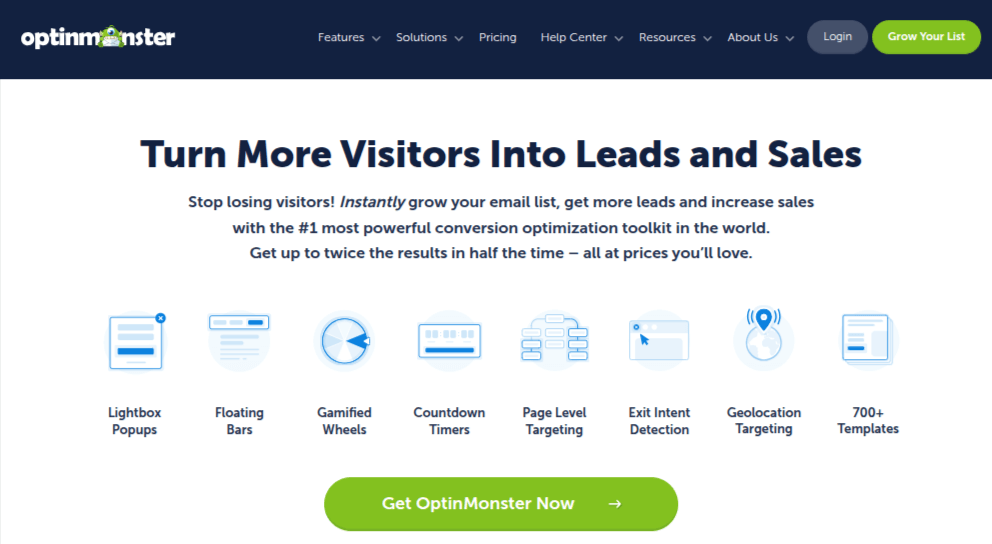
Key popup features:
- MonsterLink: Triggers a popup only when a user clicks a specific link or button, utilizing the psychology of “positive action.”
- Exit-Intent technology: The gold standard for detecting when a user is about to leave and firing a last-second offer.
Bonus features:
- AdBlock detection: Shows targeted messages specifically to visitors using ad blockers.
- Geo-Location targeting: Displays different popups based on the visitor’s physical location (city/country).
Starts at $9/mo (billed annually).
3. Popup Maker
Popup Maker is the most popular “freemium” option for WordPress users who want total design control and unlimited impressions.
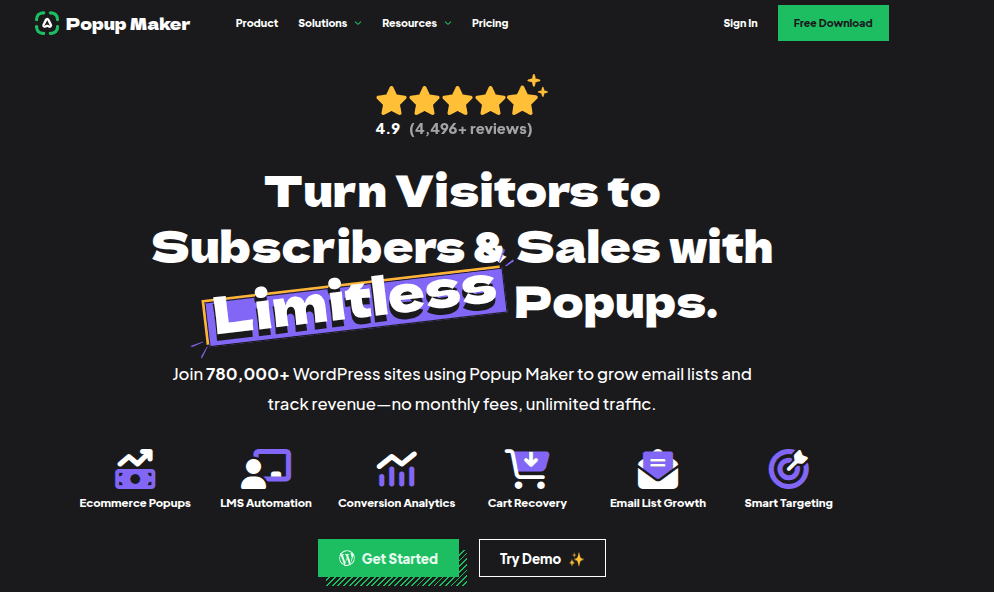
Key popup features:
- Precision cookie targeting: Advanced control over how often a user sees a popup based on their previous interactions.
- Scroll & delay triggers: Highly reliable free triggers for showing popups after a user spends time on a page.
Bonus features:
- Theme editor: A built-in design tool to create custom popup styles that match your site’s CSS perfectly.
- AJAX form support: Ensures your popups can submit forms without refreshing the page, keeping the user experience smooth.
Free version available; Pro (for Exit-Intent) starts at $87/yr.
4. Elementor Pro (Popup Builder)
Elementor Pro is a professional design canvas that allows Elementor users to build popups using the same drag-and-drop interface as their pages.

Key popup features:
- Dynamic content integration: Pulls data (like the user’s name or product price) directly from WordPress into the popup.
- Visual canvas: No templates needed—you can design a popup of any shape or size from scratch.
Bonus features:
- Full theme builder: Allows you to design custom headers, footers, and archive pages for your entire site.
- AI writing assistant: Uses built-in AI to generate headlines and copy for your popup campaigns.
Included in Elementor Pro, starting at $59/yr.
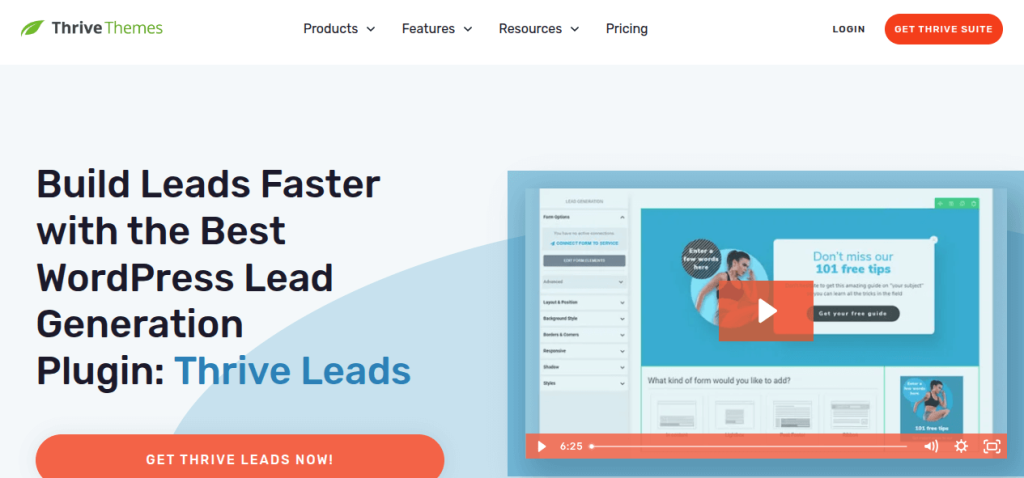
5. Thrive Leads
Thrive Leads is a conversion-focused list-building plugin that prioritizes A/B testing and data-driven growth.
Key popup features:
- SmartLinks: Automatically hides popups from people who have already subscribed to your list to avoid annoyance.
- A/B testing engine: Effortlessly tests headlines, designs, and triggers against each other to find the winner.
Bonus features:
- Asset delivery: Automatically sends a PDF or “lead magnet” to the user immediately after they sign up.
- Global fields: Update your brand info (phone, address) in one place and have it reflect in every popup on your site.
Standalone plugin for $99/yr.
6. Omnisend
Omnisend is an e-commerce marketing platform that focuses on “gamified” popups to increase engagement.

Key popup features:
- Wheel of fortune: An interactive “spin-to-win” popup that typically sees higher conversion rates than static forms.
- SMS & WhatsApp capture: Specialized fields designed specifically to collect phone numbers for mobile marketing.
Bonus features:
- Omnichannel Workflows: Syncs popup data with SMS and email campaigns in one unified dashboard.
- Sales Tracking: Shows you exactly which popup campaign led to a specific purchase in your WooCommerce store.
Free (up to 250 contacts); Paid starts at $16/mo.
7. Convert Pro
Convert Pro is a speed-optimized popup plugin designed by the creators of the Astra theme for ultra-fast loading.
Key popup features:
- Modular architecture: Only loads the scripts you are actually using, keeping your site speed (and SEO) at peak levels.
- Click-to-Popup: Converts any text or image on your page into a trigger for a lightbox popup.
Bonus features:
- Cloud templates: Access a massive library of designs that are stored in the cloud, so they don’t bloat your server.
- Google Analytics integration: Seamlessly pushes popup events into your GA4 dashboard for advanced tracking.
Starts at $89/yr.
8. Hustle
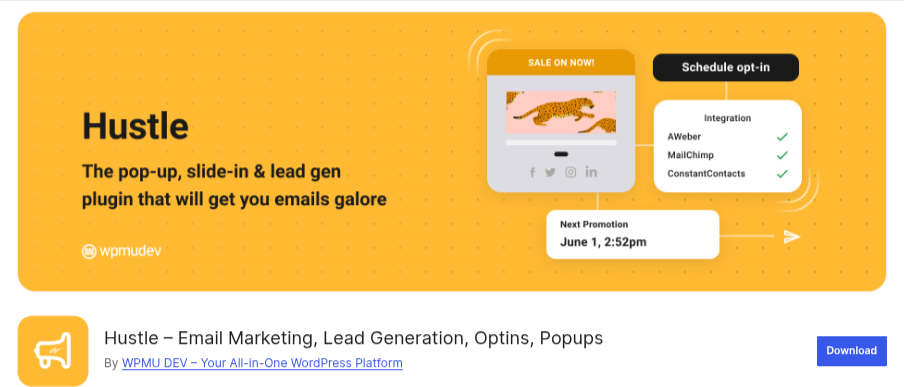
Hustle is a “clean & simple” marketing plugin from the WPMU DEV team with beautiful, high-end templates.
Key popup features:
- Social sharing popups: Dedicated layouts designed to grow your social following rather than just your email list.
- Visibility logic: Show or hide popups based on the user’s browser, device type, or even the time of day.
Bonus features:
- reCAPTCHA integration: Built-in spam protection to ensure only “real” humans are signing up for your lists.
- Designer-Grade Templates: Some of the most modern and “clean” templates available in the WordPress repository.
Pricing:
Free (up to 3 campaigns); Pro is $3/mo.
9. WP Popups
WP Popups is an intuitive, lightweight plugin focused on specific display rules and local targeting.
Key popup features:
- Geolocation targeting: Show a “Free Shipping” popup only to users in a specific state or region.
- Age verification: Includes a specialized “gate” popup for sites selling age-restricted products.
Bonus features:
- Leaving notice: A GDPR-friendly notice that triggers when a user clicks an external link to leave your site.
- Honeypot security: Stops bot submissions without needing a clunky “I am not a robot” checkbox.
Free version; Pro plans start at $35/yr.
10. Icegram Engage
Icegram Engage is a multi-format tool that offers unique messaging styles beyond the standard lightbox.

Key popup features:
- Multiple message types: Includes “Toasts” (small corner alerts) and “Action Bars” (sticky headers) in addition to popups.
- Lazy load logic: Ensures the popup doesn’t impact your “Largest Contentful Paint” (LCP) SEO score.
Bonus features:
- Icegram Express: A built-in email service that lets you send newsletters directly from your WordPress dashboard.
- Messenger triggers: Creates popups that look like chat bubbles to make your site feel more personal.
Free version is very robust; Pro is $129/yr.
How to add a high-converting WordPress popup in under 5 minutes?
Here are 6 steps to add a popup in your WordPress site:
- Install Retainful from the WordPress plugin store.
- In your Retainful dashboard, click on the Sign up Forms option and then select the type of popup you want to create. You can select from:
- Welcome popup
- Add to cart popup
- Exit intent popup
- Embed signup form
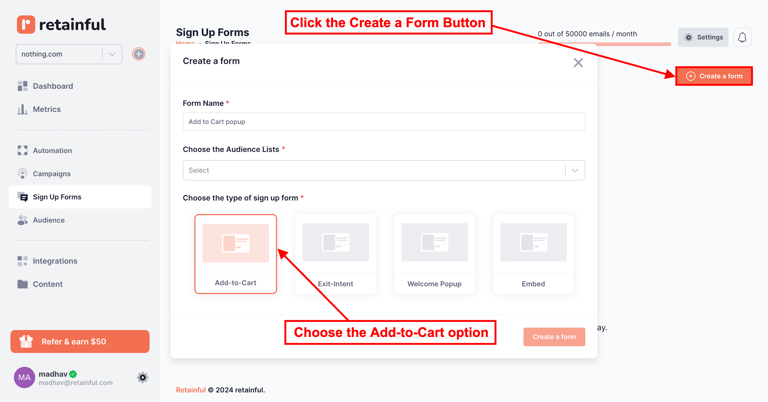
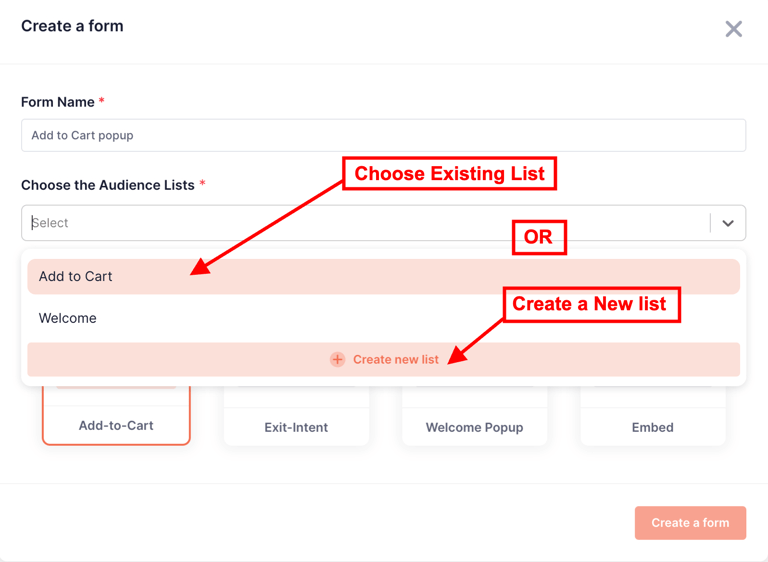
3. Once you’ve filled in the name and selected the list for your popup, select a popup template.
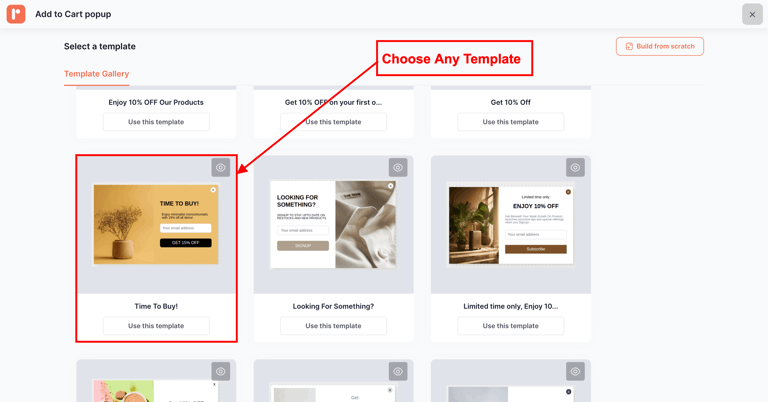
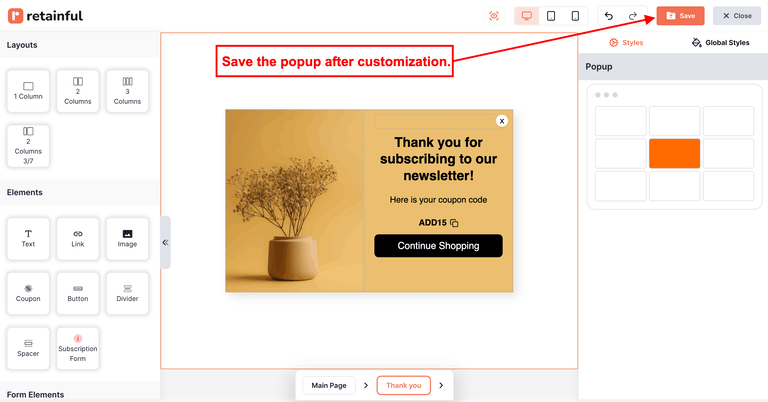
4. Customize and save your popup template.
5. You can set the triggers and target audiences of your popup.
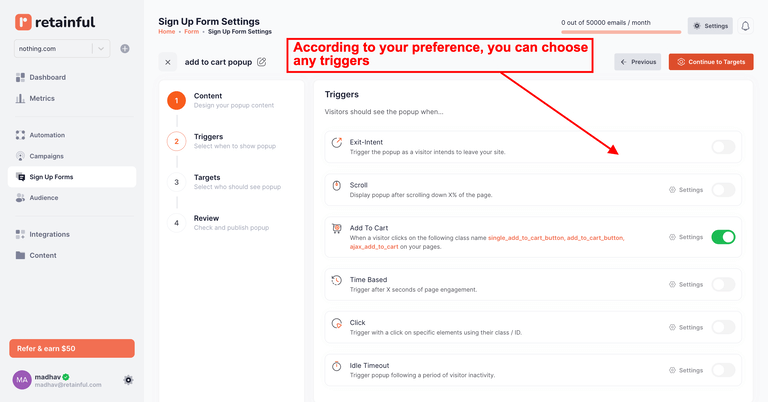
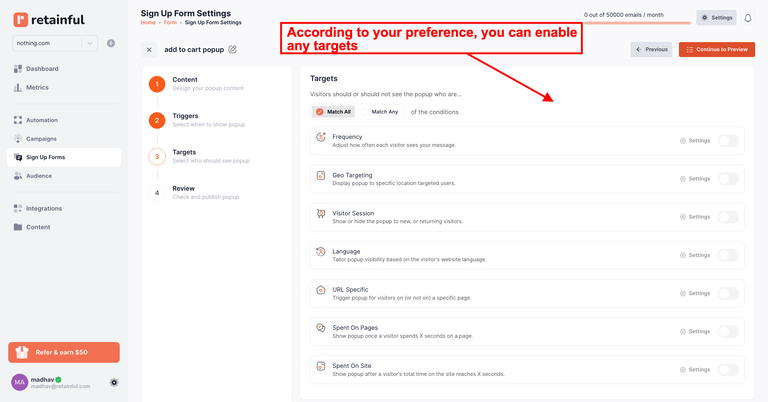
6. Click Save & Publish to go live.
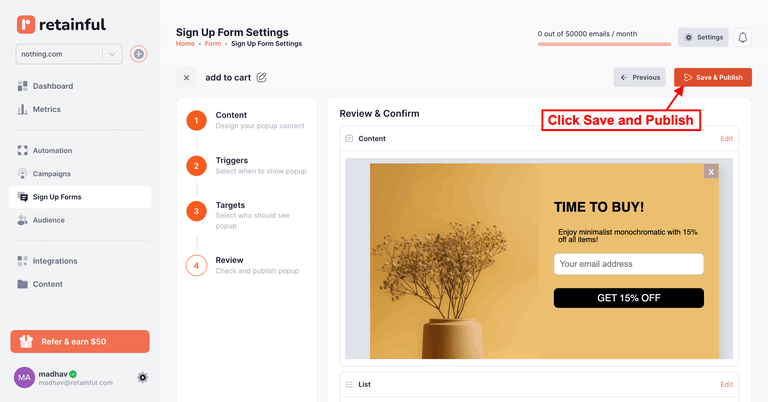
How to create WordPress popups without plugins?
Creating a WordPress popup without a plugin is a great way to keep your site lightweight and fast. You can do this using the native WordPress Block Editor (Gutenberg) and a tiny bit of CSS.
Here are 2 ways to create WordPress popups without plugins:
- Using the Gutenberg “Details” block (Easiest)
- Using the “Full Site Editor” (Best for Overlays)
Method 1: Using the Gutenberg “Details” block (Easiest)
This creates a “click-to-reveal” popup effect without any code at all.
- Open your Page/Post: Go to the editor where you want the popup.
- Add a “Details” Block: Click the (+) icon and search for “Details.”
- Set the Trigger: In the “Summary” section, type what you want the user to click (e.g., “Click here for a surprise!”).
- Add Content: Inside the hidden space below, add your content (text, image, or a signup form).
- Customize: Use the block settings on the right to add a background color or border to make it look like a popup box.
Method 2: Using the “Full Site Editor” (Best for Overlays)
If you are using a modern block theme, you can use the Overlay feature.
- Open the Site Editor: Go to Appearance > Editor.
- Add a “Navigation” or “Button” Block: This will be your trigger.
- Use the “Overlay” Pattern: Some themes have a “Modal” or “Overlay” pattern built into the (+) Insert > Patterns section.
- Link the Button: Link your button to the specific overlay block ID.
Why still you might need WordPress Popup plugins?
While the methods above are free and fast, they lack the “Smart” features that drive the 15% recovery rate we discussed:
- No Exit-Intent: You can’t detect when someone is leaving with simple HTML.
- No Cookies: The popup will show every single time the page is refreshed, which can annoy users.
- Lack of Analytics: You won’t know how many people clicked it.
WordPress popup example – AeroPress
AeroPress uses a two-step engagement process rather than a standard “welcome popup”.
- The trigger: The popup appears after a high-intent signal, such as 5 seconds of dwell time or scrolling 50% of the page. This ensures the user is actually interested in the content before being interrupted.
- The Micro-commitment: Instead of asking for an email immediately, they use a button (e.g., “Reveal My Discount”). Clicking this is a “micro-commitment” that makes the user 86% more likely to finish the second step, entering their email.
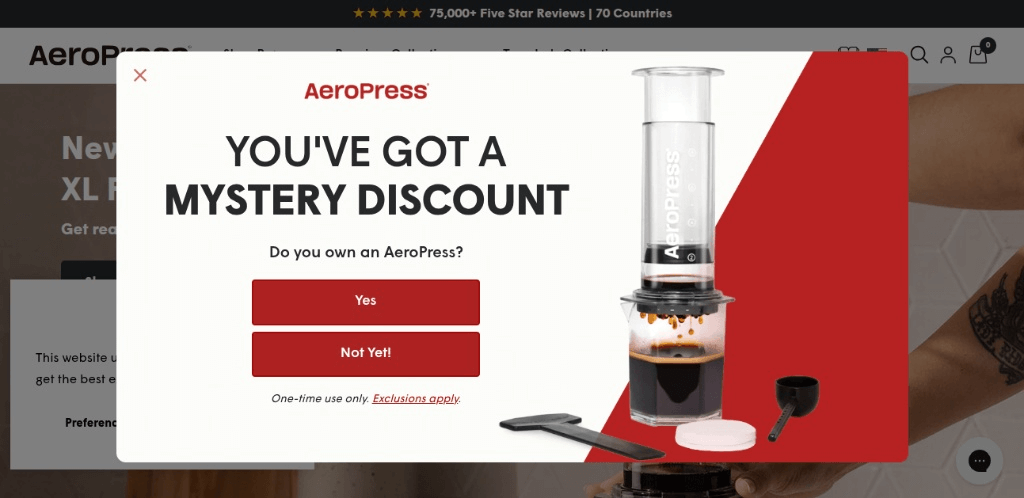
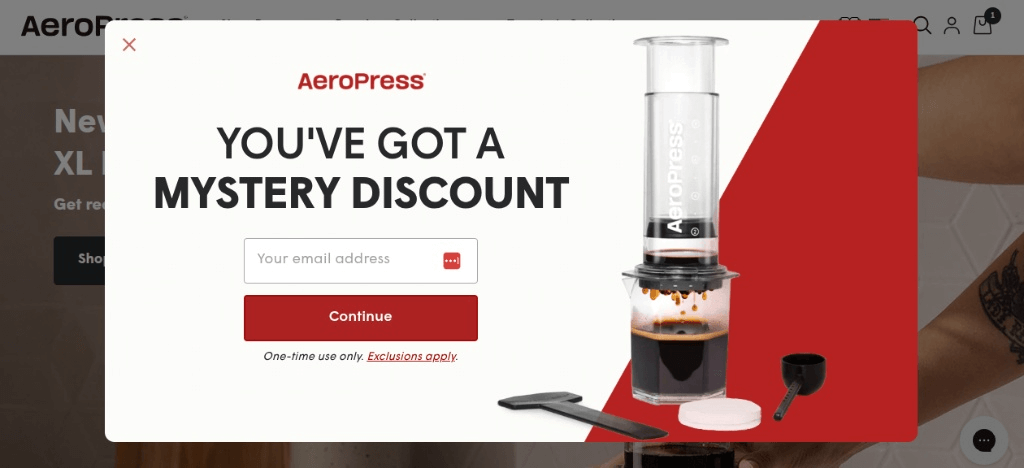
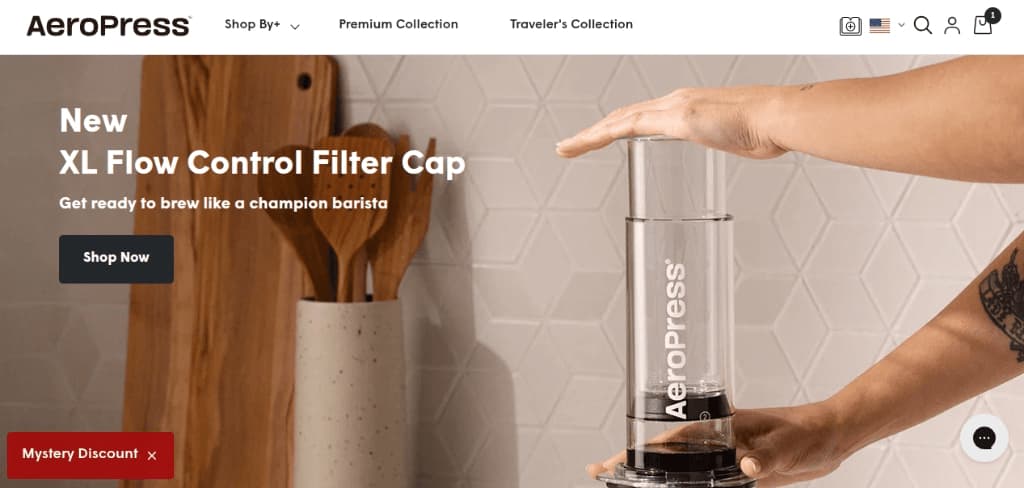
- Safety net: If the user closes the main popup, it “morphs” into a small, persistent floating action button (FAB) labeled “Mystery Discount”. It stays out of the way but remains accessible when the user is finally ready to buy.
Key takeaways
- Curiosity > discounts: Using a “Mystery” offer performs better than a standard “10% Off” because it taps into the user’s desire to “solve” the mystery.
- Stage the commitment: Don’t lead with the form. Lead with a question or a button to lower the user’s “defense” against marketing.
- Persistence without annoyance: A floating button is the “gentle nudge” that keeps the offer alive without blocking the screen.
What can be done better in this WordPress popup example?
- Progressive profiling: In the second step (after the email), AeroPress could ask one simple question (e.g., “How do you brew?”) to segment their list immediately for targeted follow-up.
- Visual urgency: If the user clicks the floating button later, adding a small countdown timer could push them to use the code before they leave the site.
The WordPress popup checklist: Do’s & Don’ts
The do’s – Use these best practices in your WordPress popup
- Set Frequency Caps: Use cookies to ensure a user only sees the same popup once every 30 days.
- Mobile-First Design: Use “teaser” bars on mobile that take up less than 20% of the screen to avoid Google’s SEO penalties.
- Test the “7-Second Rule”: Wait at least 7–10 seconds before triggering to allow the user to orient themselves.
- Clear Exit Path: Ensure the “X” button is large and easy to find, especially on touchscreens.
Related reading: 10 Popup Best Practices + Examples
The don’ts – Avoid these common mistakes in your WordPress popup
- Avoid “Confirm-Shaming”: Never use buttons like “No thanks, I don’t want to save money,” it hurts brand trust.
- Don’t Ask for Too Much: Every extra form field (Phone, Name, etc.) drops your conversion rate by roughly 25%.
- No “Double-Dipping”: Don’t show a popup if the user is already subscribed or came from an email link.
- Don’t Sacrifice Speed: Always compress the images in your popup; a slow-loading popup can spike your bounce rate.
Wrap up!
The key to getting WordPress popups right is balance – using the right plugin to create messages that add value, not frustration.
The best WordPress popup plugins give you the tools to strike that balance. They offer customization, targeting, and integration without overwhelming you with complexity.
Ultimately, the right plugin for adding WordPress popups is the one that aligns with your goals and respects your users.
Target the quality leads with Retainful’s advanced popup targeting options and grow your email list.
Also read:
- 10 Best Discount Email Templates + Examples
- 10 Order cancellation email templates + examples, tips & subjectlines
- 20 Best Valentine’s Day marketing ideas for 2026 (Backed by data)
WordPress popup plugin frequently asked questions :
Retainful is the best choice because it specializes in e-commerce. It uses “Add-to-Cart” triggers and automatic coupon generation to recover abandoned carts and drive repeat sales directly from your popup campaigns.
High-performance plugins like Retainful and Convert Pro do not slow down sites. They use modular loading to ensure scripts only fire when triggered, keeping your Core Web Vitals healthy and your SEO rankings high.
Yes, you can use the WordPress Block Editor’s “Details” block for simple click-to-reveal content. However, plugins are recommended for advanced features like exit-intent, automated triggers, and detailed conversion analytics.
Exit-intent popups detect mouse movement towards the browser’s close button. By offering a timely discount or resource, they can rescue up to 15% of abandoning traffic and turn them into subscribers.
Popups are only penalized if they are intrusive. To stay SEO-safe, use mobile-friendly “teasers” or floating buttons that take up less than 20% of the screen rather than full-screen overlays.