175 million people message a WhatsApp business account every single day. Your customers are already on WhatsApp. The WhatsApp message examples from big businesses prove just how powerful the platform has become.
WhatsApp is no longer just a chat app; it’s the most powerful tool for customer service, sales, and personalized marketing. With open rates near 98% and conversion rates far higher than email.
If you’re wondering how to use it effectively and what WhatsApp messages to send, you’re in the right place.
In this article, we’ll share the secrets to high-converting WhatsApp communication:
- WhatsApp message templates for different business scenarios: Copy-and-paste templates covering transactional, marketing, and service needs.
- 12 Best WhatsApp message examples
- Do’s and don’ts to get approval for WhatsApp templates.
Create high-impact WhatsApp messages without any hassle using Retainful’s automation workflows.
WhatsApp greeting message templates
A greeting and welcome message sets the tone of your brand and establishes clear expectations.
We’ve curated a list of WhatsApp greeting message templates that you can use for your business.
WhatsApp greeting message with a discount
Welcome to the [Brand Name] Family! 🎉
Hi [Customer Name]! Thanks for joining us on WhatsApp. As a special thank you, enjoy 15% OFF your first order! Use code: WELCOME15 at checkout.
Shop Now!
Welcoming first-time buyers using a WhatsApp message greeting
Thank You for Your First Order! 🙏
Hi [Customer Name]! We just confirmed your order #[Order ID]. Your support means the world to our team!
Keep an eye on this chat for tracking updates. Need anything? Just reply here!
Track My Order
WhatsApp greeting message for welcoming into a community
Welcome to the [Community Name] family! 🚀
We're thrilled to have you, [Customer Name]! You're now connected with [Number] fellow [Member Type] who share your passion for [Topic/Interest].
Get started by checking out our latest resources:
[Link to Community Page]
Explore Resources
WhatsApp message templates for marketing (promotional and engagement)
Flash sale / limited-time offer - Marketing WhatsApp message template
FLASH SALE IS LIVE! ⏰
Hey [Customer Name]! Our [Duration] Flash Sale just dropped. Get [Discount]% OFF sitewide!
Shop now before the timer runs out at [Time/Date].
[Link to Sale]
Shop Now & Save!
Seasonal / holiday campaign WhatsApp message template (e.g., BFCM)
Black Friday Preview: 🎁 Early Access for You!
You're on the list, [Customer Name]! Enjoy [Discount]% OFF all [Product Category] for the next 24 hours. No crowds, just massive savings.
Use code: [Coupon Code]
[Link to BFCM Collection]
Unlock Early Access
Product launch WhatsApp message template
IT'S HERE! Introducing the [Product Name] 🤩
Good news, [Customer Name]! The highly anticipated [Product Name] is finally here! We only have a limited stock.
Be the first to try it!
[Link to Product Page]
View New Product
Engagement-driven: feedback/review request WhatsApp message template
Tell Us What You Think! ⭐
Hi [Customer Name]! We hope you're loving your [Product Name].
Could you spare two minutes to leave a quick review? Your feedback helps [Brand Name] grow!
[Link to Review Page]
Leave a Review
WhatsApp message template to claim loyalty reward
Your Loyalty Rewards Are Ready! 💰
Great news, [Customer Name]! You currently have [Points/Credit Amount] in your loyalty account.
Time to spend them! Use your credit on your next order:
[Link to Shop/Rewards Page]
Redeem My Rewards
WhatsApp business utility templates (Transactional and service messages)
Order confirmation WhatsApp message template
🛒 Order Confirmed!
Your [Brand Name] Purchase!🎉
Hi [Customer Name]! We successfully received your order #[Order ID]. Your estimated delivery date is [Date]. You can view your order details here: [Link to Order Summary]
View Order Summary
Shipping update WhatsApp message template
🚚 Shipped! Your Order #[Order ID] is on its way!
🚛 Great news! Your order #[Order ID] has been shipped via [Carrier Name]. It should arrive in [Estimated Days] days. Track its journey here:
Track My Package
Delivery confirmation & feedback request WhatsApp message template
📦 Delivered! We hope you love it! 🥳
Your order #[Order ID] has been successfully delivered!
Please take a moment to confirm you received your [Product Name] and share your experience:
[Link to Feedback/Review Form]
Share Feedback
Reschedule delivery WhatsApp message template
🚨 URGENT: Delivery Update for Order #[Order ID]
We regret to inform you that your delivery was unsuccessful today due to [Reason for Issue].
Please click the button below to easily reschedule or update your address.
Reschedule Delivery
WhatsApp message template for customer service
Query Received: We're on it!🧑💻
Thank you for reaching out, [Customer Name]. We have received your query regarding [Order ID/Topic].
Our team will review this and get back to you with a resolution within [Timeframe/Date].
Visit Our Help Center
12 WhatsApp message examples from big brands
The most effective way to learn is to look at the examples. We’ve curated a list of the best WhatsApp message examples.
Here are the best WhatsApp message examples
- Welcome & first-purchase incentive WhatsApp message example
- Lead generation WhatsApp message example: B2B customer acquisition
- WhatsApp message example to recover browse abandonment
- Abandoned cart recovery using WhatsApp message from Amazon
- Flash sale WhatsApp message example from Fast Track
- Discount coupon delivery using a Promotional WhatsApp message
- Order confirmation WhatsApp message example
- Tracking orders status via WhatsApp message (Shipping update)
- Delivery issue alert: proactive rescheduling option using WhatsApp
- Post-purchase WhatsApp message example: Delivery confirmation & customer feedback request
- Customer service WhatsApp message example from Amazon (Confirming query submission)
- Opt-out customer service WhatsApp message example from Amazon
Related reading: 5 Best Shopify WhatsApp Apps to Increase Sales in 2025
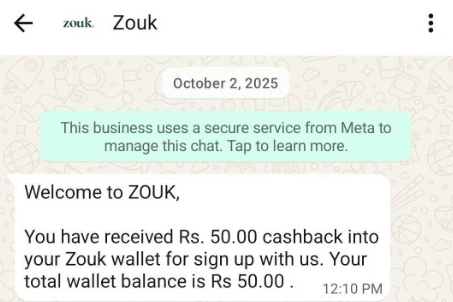
Welcome & first-purchase incentive WhatsApp message example
Key takeaways:
- The welcome message clearly confirms that the Rs. 50 cashback has been successfully credited.
- Provides simple, transparent transactional details, including the updated wallet balance.
- Smoothly guides the user from sign-up to taking the next action, like browsing or making a purchase.
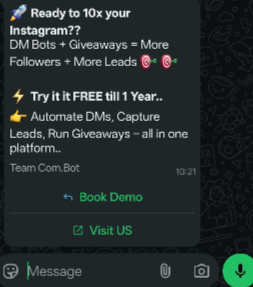
Lead generation WhatsApp message example: B2B customer acquisition
Key takeaways:
- Grabs attention with a bold promise about growing Instagram quickly.
- Clearly explains the value by showing how the tools lead to more followers and leads.
- Offers a huge incentive—a free trial for up to a year—to encourage sign-ups.
- Provides two CTAs (“Book Demo” and “Visit Us”) to suit both ready-to-buy and exploring users.
Related reading: 14 Inspiring Lead Nurturing Email Examples
WhatsApp message example to recover browse abandonment
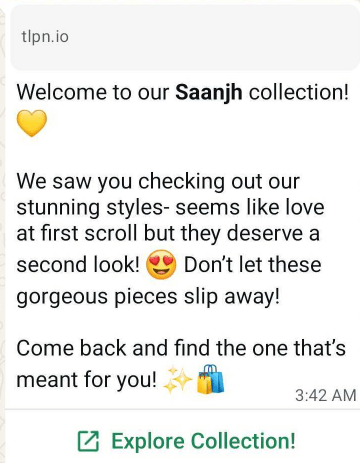
Key takeaways:
- Uses warm, friendly language to make the reminder persuasive without feeling pushy.
- Includes a clear CTA (“Explore Collection!”) that makes it easy for customers to return and browse.
- Re-engages bowse abandoners by referencing the specific “Saanjh collection,” making the message personalized and relevant.
Abandoned cart recovery using WhatsApp message from Amazon
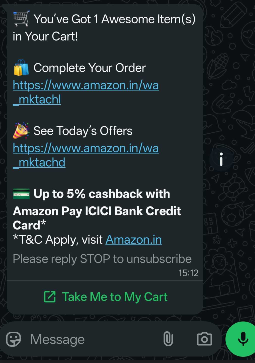
Key takeaways:
- The abandoned cart recovery message reminds the user they have an item in their cart and makes it sound positive and exciting.
- It gives multiple reasons to complete the purchase, a direct checkout link, today’s offers, and a cashback incentive.
- A clear “Take Me to My Cart” button removes all friction in cart recovery, and an easy STOP option ensures compliance with opt-out rules.
Recover abandoned carts efficiently using Retainful’s omnichannel workflows.
Flash sale WhatsApp message example from Fast Track
This is a prime example of a marketing template used to drive immediate sales and traffic during a limited-time event.
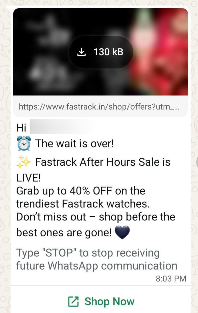
Key takeaways:
- Creates urgency with strong, time-sensitive language that triggers immediate action.
- Clearly states the offer upfront (“Up to 40% OFF”) so users instantly understand the value.
- Uses a “Shop Now” CTA for a frictionless purchase path, while also providing an easy opt-out for compliance.
Related reading: 10 Best Discount Email Templates + Examples
Discount coupon delivery using a Promotional WhatsApp message
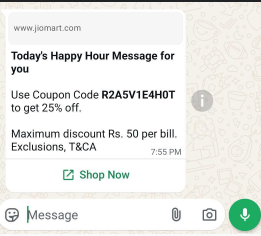
Key takeaways:
- The “Happy Hour” label creates a sense of urgency, pushing the user to act quickly.
- The message clearly gives the main benefit upfront—a 25% off coupon code.
- It builds trust by stating important limits (max ₹50 discount, exclusions).
- A “Shop Now” button makes it easy for the user to apply the coupon and buy immediately.
Order confirmation WhatsApp message example
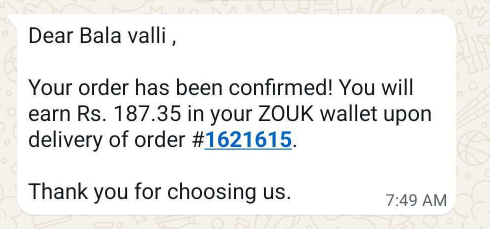
Key takeaways:
- The message confirms the order right away and includes the order number for clarity.
- It promises wallet cashback after delivery, encouraging the customer to shop again.
- Personalization (“Dear Bala valli”) makes the message feel trustworthy and more human.
Related reading: 9 Best Order Confirmation Email Templates & Examples
Tracking orders status via WhatsApp message (Shipping update)
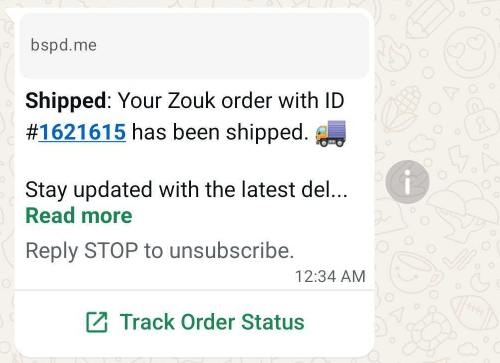
Key takeaways:
- The bold “Shipped” update immediately tells the user their order is on the way.
- It includes the order ID and brand name so the customer knows exactly which purchase it refers to.
- A “Track Order Status” button lets the user check shipping updates instantly.
Delivery issue alert: proactive rescheduling option using WhatsApp
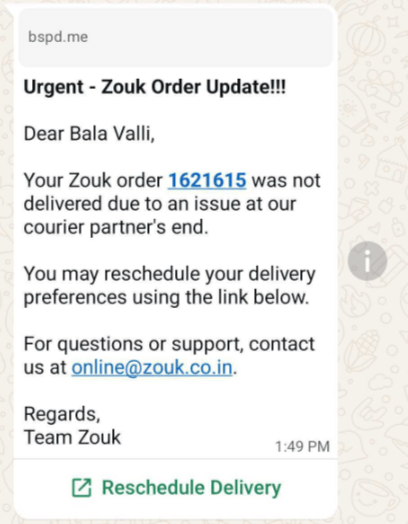
Key takeaways:
- The message creates urgency and explains the delivery issue honestly so the customer understands what went wrong.
- It feels personal by using the customer’s name and order number.
- A “Reschedule Delivery” button gives an easy, one-click fix.
- An email support option is provided for customers who need extra help.
Post-purchase WhatsApp message example: Delivery confirmation & customer feedback request
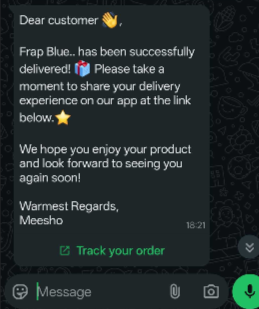
Key takeaways:
- Confirms the product was delivered and asks for feedback right away, increasing the chance of a response.
- Mentions the exact product name so the customer knows which order it refers to.
- Provides an easy feedback link and a “Track your order” button for added convenience.
- Ends with a warm, friendly message that encourages future purchases.
Customer service WhatsApp message example from Amazon (Confirming query submission)
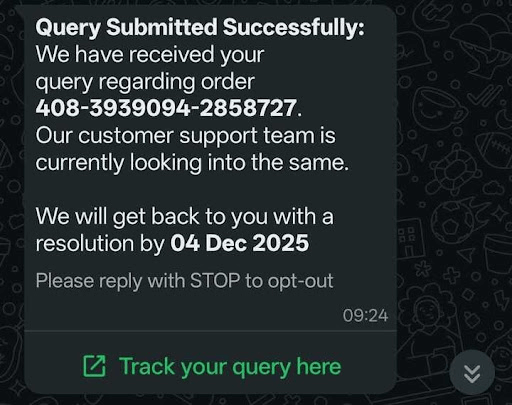
Key takeaways:
- Confirms the query was submitted successfully, giving instant reassurance.
- Shares a clear resolution timeline so the customer knows when to expect a response.
- Includes the order number to avoid confusion and ensure accuracy.
- Provides a “Track your query” button and an easy STOP option for compliance.
Opt-out customer service WhatsApp message example from Amazon
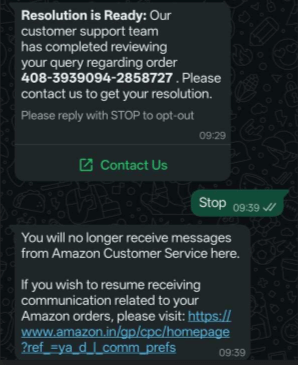
Key takeaways:
- Clearly tells the customer that their issue has been resolved.
- Provides a “Contact Us” button so they can easily see the resolution details.
- Handles opt-out requests instantly and confirms when messages are stopped.
- Still allows customers to access important order updates if they choose to resume communication.
WhatsApp template approval - Do’s & Don’ts
Template approval is critical for your WhatsApp strategy, as non-compliance leads to rejection or a low-quality rating.
Connect with our expert team to set up your WhatsApp workflows. Let us handle the technical and compliant stuff - Make a quick call
Do’s: Best practices for template creation
- Be clear and concise: Write messages that are easy to understand. Place the most vital information (like the discount percentage or order ID) at the beginning.
- Use proper formatting: Use bolding and line breaks effectively. You can use emojis sparingly and appropriately (ideally, under 10).
- Correct placeholder usage: Use sequential placeholders. When submitting the template, always provide realistic sample text for every variable to give Meta context.
- Maintain professional tone: Your message should sound friendly and professional, avoiding excessive punctuation (e.g., three exclamation marks) or overuse of all caps.
- Match category and content: Ensure a template designated as a Utility message (e.g., an order confirmation) does not contain Marketing content (e.g., a "Shop Now" upsell for another product).
- Use full URLs: When including links, use the full, descriptive URL. Avoid using URL shorteners (like Bitly) as they often lead to rejection.
- Proofread thoroughly: Check for all spelling and grammatical errors to maintain brand professionalism.
Don’ts: reasons for template rejection
- No disguised marketing: Never try to submit a clearly promotional message (e.g., announcing a sale) as a Utility template. This is the number one reason for rejection.
- Avoid sensitive data requests: Do not ask customers for private or financial information, such as credit card numbers, passwords, bank account details, or government IDs.
- Don't abuse placeholders: Do not use placeholders to create the entire message or place them consecutively. Placeholders must be embedded within static text.
- No policy violations: Ensure your content adheres to WhatsApp's policies—this includes avoiding hate speech, illegal activities, abusive language, or content related to prohibited products (e.g., gambling, tobacco, illegal drugs).
- No duplicate submissions: Do not submit a template that is an exact copy of a template you already have approved or one that was recently rejected.
- Limit excessive formatting: Avoid using ALL CAPS for entire sentences (outside of headlines) or using excessive special characters.
Clear opt-In/opt-Out
Clear opt-in is required to start a conversation, and easy opt-out prevents blocks and spam reports.
Opt-in: Explicit consent is mandatory
- Obtain explicit consent: You must secure a clear, active opt-in from every user before sending them template messages (outside of the 24-hour customer service window).
- Channel-specific agreement: The customer must understand they are agreeing to receive messages specifically on WhatsApp, not just email or SMS.
- Define your use case: Clearly tell the customer what type of messages they will receive (e.g., "Order updates and occasional promotional offers"). This sets expectations.
- Passive opt-in is forbidden: Consent must be a positive action (e.g., clicking a button) — pre-checked boxes or silent agreements are not considered valid opt-in consent by Meta.
- Document everything: Maintain a record of when and how the customer opted in, as Meta may audit your compliance.
Opt-out: respect and transparency
- Provide clear instructions: Include an explicit opt-out mechanism in every single message footer. Common phrasing includes: "Reply STOP to unsubscribe" or "Type STOP to opt-out of all future messages."
- Immediate keyword recognition: Your business solution must be configured to immediately recognize and process common opt-out keywords like "STOP," "UNSUBSCRIBE," or "CANCEL."
- Instant compliance: When a user opts out, their subscription status must be updated immediately. Failure to stop messaging can lead to high block rates and account penalties.
- Confirmation message: Upon receiving an opt-out request, send one final, automated message confirming the unsubscribe was successful (e.g., "You have been successfully unsubscribed.").
- Respect preferences: Ideally, offer users the ability to manage their preferences (e.g., stop marketing messages but continue receiving essential order tracking updates).
Set up your WhatsApp workflows effortlessly with Retainful
Wrap up!
These WhatsApp message examples show how powerful the channel can be when used correctly. From greetings and order updates to promotions and customer support, the right message at the right time drives higher engagement and faster conversions.
Focus on clarity, personalization, strong CTAs, and proper opt-in practices. When your templates follow approval guidelines and deliver real value, WhatsApp becomes one of your highest-performing marketing and utility channels.
Also Read:
- WhatsApp Marketing Guide: Setup, Automation & Strategy for 2025
- WhatsApp Marketing Campaign Examples: 8 Real Success Stories
- WhatsApp vs Email Marketing: Comparison On Which Drives Real Results?
- The Ultimate Guide to Shopify WhatsApp Marketing in 2025
Frequently asked questions
A WhatsApp Message Template is a pre-approved, reusable message that businesses use to start conversations outside the 24-hour window.
WhatsApp requires templates to prevent spam and allow businesses to message customers who haven’t contacted them recently.
Utility (transactional updates), Marketing (promotions and offers), and Authentication (OTP verification).
Most templates are approved within minutes, but Meta may take up to 24 hours.
If promotional language appears in a Utility template, Meta may reclassify it as Marketing with stricter rules and higher costs.
It’s the 24-hour period after a customer messages you, during which you can send free-form replies without templates.
Yes, every new customer message restarts the 24-hour window.
High block or spam reports lower your quality rating and may limit or suspend your account.
Yes, explicit opt-in is mandatory for initiating any WhatsApp conversation.