Your customer just placed an order. They closed the checkout tab, grabbed their phone, and waited.
If your order confirmation email doesn’t hit their inbox in the next 60 seconds, they’re refreshing. If it doesn’t come in five minutes, they’re emailing support. If it doesn’t come at all, some of them are calling their bank.
That’s a transactional email. A one-to-one, automatically triggered message that a customer genuinely expects – and genuinely notices when it’s missing.
Transactional emails open at nearly 60% on average – higher than every marketing email you’ll ever send. The customers reading them are already engaged. They just bought something, or created an account, or asked for help. The moment they’re in is the best moment you’ll ever get.
This guide covers,
- what transactional emails are,
- every type your store should be sending,
- real examples of what good looks like, and
- a practical setup guide for Shopify and WooCommerce.
Send automated transactional emails with Retainful’s easy-to-setup automation.
What is a transactional email?
A transactional email is an automated, one-to-one email triggered by a specific action a customer takes on your store. It’s sent because something happened – an order was placed, a shipment went out, a password was reset.
The key word is “triggered.” Transactional emails don’t get scheduled. They fire automatically when a customer does something. No manual sending. No lists. No campaigns. One customer, one action, one email.
Every ecommerce store sends transactional emails, whether they’ve thought about them or not. Your order confirmation is a transactional email. So is the “your order has shipped” message. So is the password reset link.
The problem is that most stores treat these as system messages – the bare minimum required to confirm something happened. What they actually are is the highest-value real estate in your entire email program.
Transactional email vs. marketing email: the real difference
The clearest way to understand this: a marketing email is something you choose to send. A transactional email is something the customer expects to receive.
Here’s how they differ in practice:
| Category | Transactional Email | Marketing Email |
| Triggered by | Customer action | Marketer’s schedule |
| Purpose | Confirm, inform, update | Promote, engage, sell |
| Opt-in required | No (in most jurisdictions) | Yes |
| Open rates | 40–60% | 15–25% |
| Examples | Order confirmation, shipping update, password reset | Newsletter, sale announcement, product launch |
| Sending infrastructure | Dedicated transactional server | Marketing email platform |
A few emails sit in a grey zone. Abandoned cart emails, for example, are triggered by behavior – but in many jurisdictions they’re classified as marketing emails because they’re designed to drive a purchase. If you’re sending abandoned cart emails (and you should be), keep them in your marketing automation tool, not your transactional email system.
For a deep dive into email automation as a whole, this email automation guide walks through the full picture.
Why transactional emails are the most valuable emails your store sends
Three numbers that matter here:
- Nearly 60% – that’s the average open rate for post-purchase transactional emails, according to Klaviyo’s email benchmarks data. Compare that to the 49% average for standard automation flows. Nothing you design and write will come close.
- 26% more unique clicks – what personalized transactional emails earn over generic ones, according to Experian research. Adding the customer’s name to the right place pays off immediately.
- 46% increase in clicks when an order confirmation email includes a tracking link, per Experian. That one addition significantly changes how customers engage with your message.
These numbers exist for a simple reason: transactional emails arrive at peak interest. A customer who just placed an order is more engaged with your brand at that moment than at any other point in the relationship. They’re excited. They’re paying attention. They’re expecting to hear from you.
That moment doesn’t last long. And if the email they get is a cold, unformatted, logo-free Shopify default – you’ve wasted it.
There’s also a business protection argument here. According to Klaviyo’s 2025 Future of Consumer Marketing Report, 32% of shoppers turn to customer service after a bad experience.
A clear, timely transactional email that answers the questions before they’re asked – where’s my order, when does it arrive, what if I need to return it – is the most efficient customer service you can do.
SuperOffice data shows that the average response time to a customer service email is over 12 hours. Your transactional email can answer the same question in seconds.
8 types of transactional emails every ecommerce store needs
1. Order confirmation email
This is the first email a customer receives after completing a purchase. It arrives immediately and if it doesn’t, something is wrong.
What it should include:
- Order number (prominently placed)
- Product name, quantity, price
- Shipping address
- Estimated delivery date
- Payment method and total charged
- Link to track the order (if available)
- Contact information or support link
What most stores get wrong: Generic subject line (“Order #12345 Confirmed”), no brand personality, no product images, and a design that looks nothing like the store. This is the email the customer will screenshot, forward to their partner, and open again when the package arrives. It deserves real design attention.
What good looks like: “Your order is confirmed, Name – here’s what you got” with product images, a clear breakdown, and a human CTA like “Questions? We’re here.”
For templates you can adapt right now, see this order confirmation email guide.
2. Shipping confirmation email
Sent when the order leaves the warehouse and a tracking number is available. This is the second most-opened email in the post-purchase sequence.
What it should include:
- Tracking number and direct tracking link
- Carrier name
- Estimated delivery window
- Items being shipped (with images)
- What to do if there’s a problem
Per Experian research, adding a tracking link to shipping confirmation emails drives a 62% increase in clicks. Include it every time. Make it prominent.
Timing: This should fire automatically the moment your fulfillment system marks an order as shipped. Any delay is a customer service issue waiting to happen.
3. Delivery confirmation email
Often overlooked. This fires when the carrier marks the package as delivered.
Why it matters: “delivered” on a carrier’s system doesn’t always mean the customer has it. Porch theft is real. Packages get marked delivered before they arrive. A delivery confirmation that says “your package arrived – let us know if something’s off” is the difference between a silent refund dispute and a resolved issue before it becomes a chargeback.
What it should include:
- Confirmation that the item was delivered
- Delivery timestamp and address
- A simple feedback prompt
- Return or contact information if something went wrong
This is also a natural moment to ask for a product review. See product review request email examples for how to do this without it feeling forced.
4. Order cancellation email
Sent when an order is cancelled – either by the customer or because something went wrong on your end (out of stock, payment failure, fulfilment issue).
Most stores send a cold, template-generated cancellation message. The stores that retain customers through cancellations treat this email as a save opportunity.
What it should include:
- Why the order was cancelled (be specific)
- Refund status and timeline
- Alternative products, if relevant
- A direct line to customer service
If the cancellation was your fault – stock issue, shipping problem – own it. According to Klaviyo’s 2025 data, 50% of consumers will give a brand a second chance after a negative experience if they receive something tangible in response (a refund, a discount, a replacement). Your cancellation email is that “something.”
For cancellation email templates, this order cancellation email guide has 10 ready-to-adapt options.
5. Refund notification email
Sent when a refund has been processed. Customers are often anxious about whether the money is actually coming back. This email answers that anxiety before it turns into a support ticket.
What it should include:
- Confirmation that the refund was processed
- Amount refunded
- Expected timeframe (typically 3-7 business days, depending on bank)
- Order details for reference
- A follow-up offer (if appropriate and legal in your jurisdiction)
A clean, clear refund email does two things: it closes the loop on a negative experience, and it leaves the door open for the customer to come back. See order refunded email templates for examples built around retention.
6. Password reset email
Simple but important. A customer who can’t log in is a customer who can’t buy. Password reset emails need to be fast, clear, and secure.
What it should include:
- A clear subject line (“Here’s your password reset link”)
- The reset link, prominently placed
- An expiry time for the link (creates urgency, improves security)
- A note: “if you didn’t request this, ignore this email”
What to avoid: Long paragraphs, secondary content, promotional messages. The customer needs one thing. Give it to them immediately.
Timing: This must fire instantly. Any delay in a password reset email is a friction point that costs you the session.
7. Account creation / welcome email
This fires when a customer creates an account on your store – not when they subscribe to your newsletter (that’s a marketing email), but when they complete registration.
This is a transactional email by nature – it confirms the account was created. But it’s also your first real opportunity to make a personal impression.
What it should include:
- Confirmation that the account is active
- What the account unlocks (order history, faster checkout, loyalty points if applicable)
- A clear next step – not a sales pitch, a helpful direction
Note: if the customer registered during checkout, combine this with their order confirmation or send it immediately after. Two separate emails within minutes of each other is poor experience.
For welcome email examples that convert, this welcome email guide covers the full range.
8. Back-in-stock notification email
Technically triggered by a restock event combined with a customer request (“notify me when available”). One customer, one email, one specific product. This is a transactional email.
It’s also one of the highest-converting emails you can send – the customer already told you they want the product. They’ve been waiting. The email just needs to show up fast and make it easy to buy.
What it should include:
- The product name and image
- A clear CTA to buy immediately
- Stock urgency if relevant (“only 12 left”)
- Expiry of the notification if stock is limited
For templates and timing strategies, see back in stock email examples.
What a good transactional email looks like (before vs. after)
Let’s work through a real example. This is an order confirmation email from a mid-size apparel brand. I’ve recreated the structure from a real email (keeping it brand-neutral) so you can see exactly what changes and why.
The “before” email: a typical store’s order confirmation
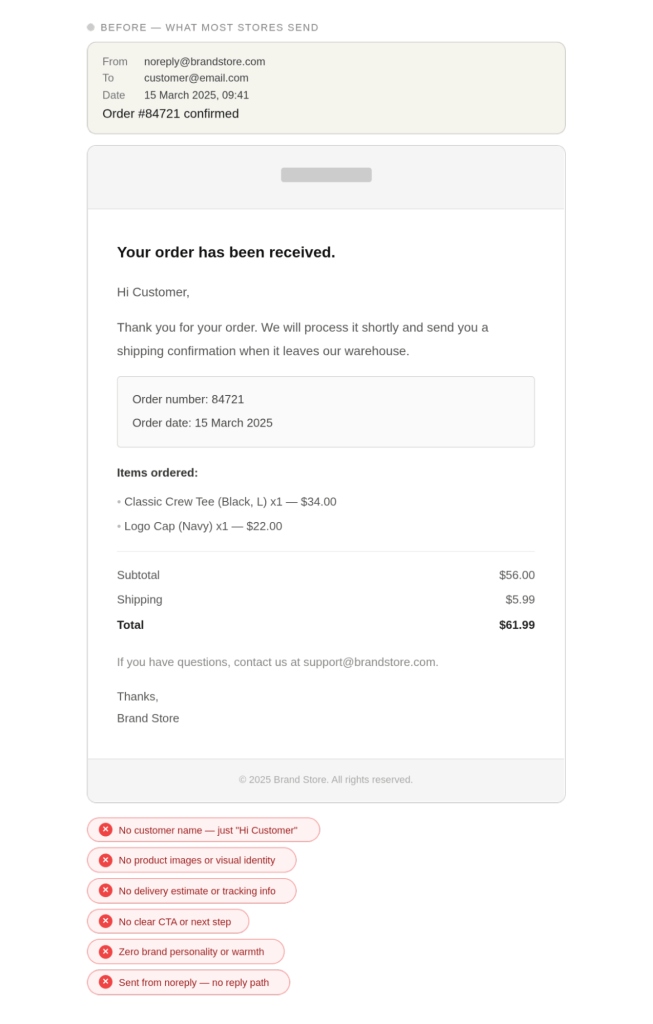
What’s wrong with this email? Let’s break it down element by element.
1. Subject line: “Order #84721 confirmed” The order number means nothing to the customer at the point of opening. They might have three tabs open, three recent purchases. A subject line like “Your Classic Crew Tee is on its way, First Name” uses the product name they actually remember buying and makes it personal.
2. Sender address: [email protected] This is one of the most damaging trust signals in ecommerce. It tells the customer: don’t bother replying, we won’t read it. It also suppresses email deliverability because ISPs treat noreply addresses as lower-quality senders. Use a real address — hello@, orders@, or team@. If you can’t manage replies from that address, at least set up an auto-responder pointing them to your help center.
3. Greeting: “Hi Customer” The customer gave you their name at checkout. Use it. “Hi Sarah” costs nothing and increases click-through rates measurably.
4. Body copy: generic and anxious “We will process it shortly” is vague and slightly worrying. “Shortly” to a customer could mean hours. Give a concrete window. “Your order goes to our warehouse today. You’ll get a shipping confirmation with tracking in 1-2 business days.”
5. Missing: estimated delivery date The order confirmation is the moment the customer is most anxious about when their item arrives. Don’t make them calculate it. Give them a date range right here.
6. Missing: a single visual of what they bought A thumbnail of the product they ordered is a quick visual confirmation that everything is correct. It also deepens the anticipation and emotional investment in the order.
7. Missing: next-step action The email ends with a support email address and nothing else. No link to order tracking, no “what happens next,” no invitation to browse related products (optional and tasteful, not a hard sell).
The “after” email: what it should look like
What changed, and why it matters:
| Element | Before | After | Why it matters |
| Subject line | Order number only | Product name + first name | Personal, memorable, scannable |
| Sender | noreply@ | orders@ | Builds trust, improves deliverability |
| Greeting | “Hi Customer” | “Hi Sarah” | Personalization lifts open rates |
| Delivery estimate | None | 19–21 March given | Removes the #1 post-purchase anxiety |
| Product visual | None | Thumbnail included | Visual confirmation, reduces “did I order the right thing?” contacts |
| Next step | Support email only | Order view button + reply address | Clear action, frictionless support path |
| Tone | Corporate and passive | Warm and direct | Matches how people actually communicate |
The anatomy of a high-performing transactional email
Every element of a transactional email has a job. Here’s what each one does.
Subject line: Your subject line competes with every other email in the inbox. Use the product name or the specific action the customer took. Avoid subject lines that start with your brand name – that’s what the “from” field is for.
Preheader text: The preview text after the subject line is prime real estate most stores leave blank or auto-populated with “View this email in your browser.” Use it. “Estimated delivery: 19-21 March. Order #84721” is far more useful.
From name and address: Use a real name or a real department (orders@, hello@, team@). A noreply address signals to both the customer and the inbox algorithm that this email isn’t part of a real conversation.
Logo and brand design: One logo at the top, clean. Transactional emails don’t need heavy design – they need clarity. A cluttered transactional email looks like a marketing email trying to disguise itself.
Personalization: First name at minimum. If you have order-specific data (product name, delivery date, address), use it. Transactional emails have the most contextual data of any email you send – use it to make them feel tailored.
The core information block: Order details, shipping address, estimated delivery, order number. Present this as scannable data, not a paragraph. Customers scan transactional emails for specific facts.
A single CTA: One button. “View your order,” “Track your package,” or “Manage your subscription.” Not three options – one clear path forward. If you want to understand how CTAs work across different email types, the guide to email CTA best practices covers button copy, placement, and conversion principles.
Support access: Make it one click to get help. A reply-to email address or a direct link to your help center. Not a buried footer link – a visible, human invitation.
Customize transactional emails in clicks with Retainful’s ready-made templates and drag-and-drop email editor.
How to set up transactional emails for your Shopify or WooCommerce store
Shopify
Shopify handles basic transactional emails natively through its notification settings (Settings → Notifications). The default templates cover the essentials – order confirmation, shipping, refunds.
The native templates work, but they’re limited. You can’t build sequences. You can’t personalise beyond basic tokens. You can’t add SMS to the same flow.
For stores that want to go beyond the defaults without hiring a developer, a purpose-built automation tool plugs into Shopify and gives you drag-and-drop control over every transactional template.
The complete guide to Shopify email marketing covers the setup process step by step, including how to migrate from default notifications to a fully customized flow.
WooCommerce
WooCommerce also handles basic transactional emails natively through WooCommerce → Settings → Emails. Like Shopify, the defaults cover the core cases but lack flexibility for sequences, personalization, or multichannel delivery.
If you’re running WooCommerce and want to understand the full email setup, from SMTP configuration to automation – the WooCommerce email marketing guide walks through every layer of the stack.
SMTP: why it matters for both platforms
Both platforms send transactional emails through your hosting server by default. That’s fine for small volumes. At higher volumes (500+ orders/month), shared hosting servers cause deliverability problems – emails land in spam or take hours to arrive.
An SMTP service (Postmark, SendGrid, Mailgun, Amazon SES) routes your transactional emails through dedicated infrastructure built for high-volume, time-sensitive sending. If your order confirmations are landing in spam, this is almost always the fix.
Transactional email best practices
- Send within 60 seconds of the trigger. Transactional emails are expected to be instant. A 30-minute delay on an order confirmation creates real customer anxiety and increases support contacts. Configure your SMTP to prioritize transactional sends.
- Use consistent branding but keep it clean. Your transactional emails should look like they came from the same brand as your marketing emails – same logo, same colors, same font. But strip out the heavy design.
- Personalise with the data you already have. You have the customer’s name, what they bought, where it’s going, and when it’ll arrive. Use all of it. A transactional email with zero personalization wastes the highest-engagement touchpoint in your business.
- Test on mobile first. According to Litmus, over 60% of email opens happen on mobile. Build your templates mobile-first and test before you send.
- Don’t bury the unsubscribe. For transactional emails, unsubscribe links aren’t legally required in most jurisdictions. But for any promotional content you include in a transactional email, you need one. Mishandling this creates compliance risk. If you want to understand where your opt-in obligations begin and end, the email compliance guide for ecommerce stores breaks it down by region.
- Track the right metrics. For transactional emails, open rate and click rate matter less than delivery rate and time-to-open. If a shipping confirmation gets opened three hours after send, the tracking link is less useful. Monitor your sending speed and delivery rate as your primary health metrics.
How Retainful handles transactional and post-purchase emails
Most store owners end up managing transactional emails through their platform’s default notifications and post-purchase automations through a separate tool.
That means two dashboards, two sets of templates, and two sets of logic to maintain.
Retainful brings both into one place. You can build your entire post-purchase email and SMS sequence – confirmation, shipping update, delivery confirmation, review request, and next-purchase coupon – inside a single drag-and-drop workflow builder, without writing code.
If you’re already running abandoned cart recovery, order follow-ups, and win-back campaigns, Retainful’s automation workflows connect all of it.
Your transactional touchpoints and your marketing touchpoints share the same customer data, the same design system, and the same analytics.
You can start with a free account and have your first transactional sequence live in under 15 minutes.
Send all types of transactional emails without any setup headache and design work with Retainful.
Conclusion
Transactional emails are the highest-engagement emails your store sends. Every order confirmation, every shipping update, every delivery notification is an open that your best marketing campaign will never match.
The gap between a forgettable confirmation and one that builds loyalty comes down to six things: a personal subject line, a real sender address, the customer’s name, a delivery date, a product visual, and one clear next step.