Roughly 20% to 40% of all subscription churn is “involuntary”. This means it’s caused by billing errors or a customer’s forgetfulness, rather than the desire to leave.
The right subscription email at the right time can save your revenue in ways you might not expect.
But which type of subscription email best suits each stage of the customer journey? How are leading brands using these emails to drive loyalty?
And most importantly, will a subscription model suit your specific business?
If you are looking for answers to these questions or simply need high-converting, free templates to get started, this article is for you.
In this article, we’ve covered:
- 14 subscription email examples from real-world brands (including Amazon, Slack, and Grammarly).
- Free, copy-and-paste subscription email templates for E-commerce and SaaS.
- Best practices used by email experts to ensure your emails actually reduce churn.
Create high-impact automated emails without any hassle using Retainful’s automation workflows.
What are subscription emails?
Subscription emails are automated, and lifecycle emails are sent to users who commit to a recurring relationship through newsletters or paid subscriptions.
They cover every stage of the marketing funnel from signup and welcome to billing, renewal, and win-back.
5 Types of subscription emails
There are 5 types of subscription emails you’ll need so that you can cover customers in every stage of the marketing funnel.
- Welcome emails confirming opt-in
- Subscription confirmation email
- Plan/subscription renewal email
- Subscription upgrade/downgrade email
- Subscription cancellation email
Connect with our expert team to set up your transactional and marketing workflows with ease. Let us handle the tech – Make a quick call
14 Best subscription email examples
We’ve curated a list of 14 subscription email examples under 5 categories.
Here are the 14 best subscription email examples:
- Welcome email that shows immediate gratification from Local Revival
- Onboarding sequence for B2B/Saas subscription email example
- Account set-up subscription email example
- Simple subscription confirmation email
- Double opt-in subscription email example
- Email verification message for existing subscribers
- The early renewal reminder with value-add email example
- Grammarly – Subscription renewal email example
- Annual renewal email example from Amazon Prime
- Subscription upgrade email example from Slack
- The final urgency upgrade offer (Ableton Live)
- Policy change notification with subscription upgrade option (Marco Polo)
- The discounted trial winback offer to continue the subscription (Zapier)
- The subscription cancellation email with a downgrade offer
Subscription welcome email examples
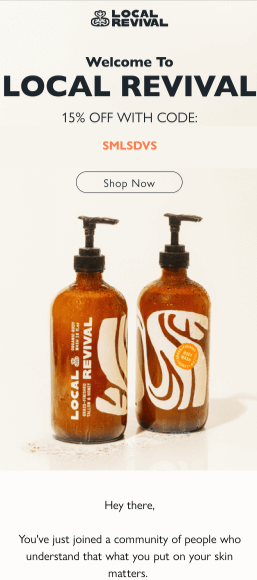
1. Welcome email that shows immediate gratification from Local Revival
Key takeaways:
- Immediate value upfront: The discount (15% off) and code are shown right after the headline to encourage a quick first purchase.
- Strong product visuals: Large, high-quality images highlight the products and build trust instantly.
- Brand connection: The welcome email positions the purchase as joining a like-minded community, not just buying a product.
- Clear next step: A single “Shop Now” CTA makes the action obvious and avoids confusion.
Create a Welcome email sequence within minutes using Retainful’s pre-built workflow templates.
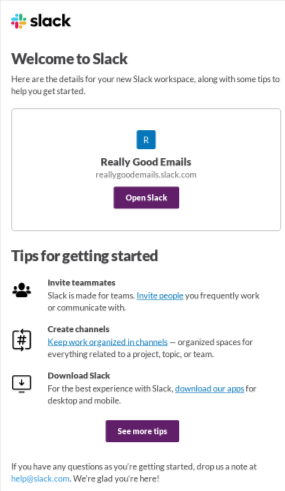
2. Onboarding sequence for B2B/Saas subscription email example
Key takeaways:
- Easy product access: The workspace name and “Open Slack” button take users straight back into the product.
- Clear onboarding steps: The email lists simple actions like invite teammates, create channels, and download Slack to help users get started quickly.
- Benefit-focused copy: Each step explains why it matters, not just what to do.
- Built-in support: A visible help option reassures users that they can get assistance if needed.
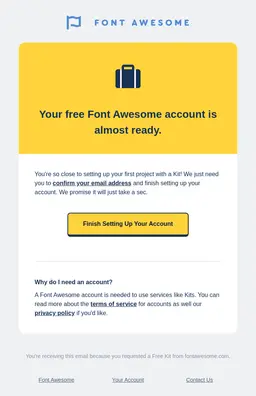
3. Account set-up subscription email example
Key takeaways:
- Value-focused message: The headline highlights the benefit—getting the account ready—instead of just asking for verification.
- Clear action: The email explains that confirming the email is the final step to start using the product.
- Reduces doubt: A “Why do I need an account?” section answers common questions and builds trust.
- Strong branding: Familiar icons and bold brand colors make the email easy to recognize and engaging.
Subscription confirmation email examples
4. Simple subscription confirmation email

Key takeaways:
- Clear purpose: The email clearly asks the user to confirm their newsletter subscription.
- One clear action: A single, bold CTA makes it easy to confirm with one click.
- Legal clarity: A short note explains that the subscription won’t be completed without clicking the link.
- Consistent branding: Bright colors and design match the brand, making the email feel friendly and trustworthy.
5. Double opt-in subscription email example
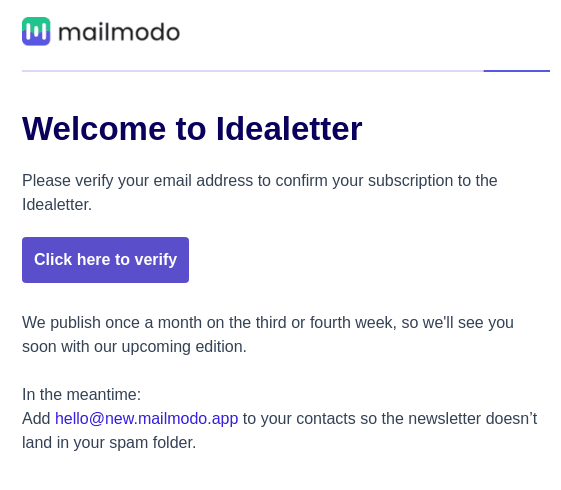
Key takeaways:
- Clear goal: The email clearly asks the user to verify their email address. Double opt-in ensures only engaged users are joining the email list.
- Set expectations about email frequency: It tells subscribers how often the newsletter will be sent.
- Avoid spam issues: A simple tip helps users ensure emails don’t go to spam.
- Clean design: A minimal layout email design with one bold CTA keeps the focus on verification.
6. Email verification message for existing subscribers
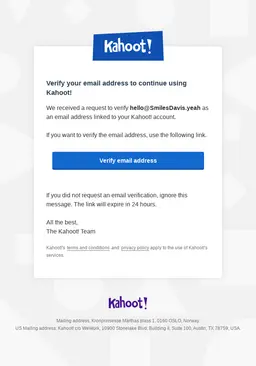
Key takeaways:
- Security-first message: The email clearly says it’s for verifying an email linked to a Kahoot! account.
- Clear identification: It shows the exact email address being verified to avoid confusion.
- Urgency with safety: A 24-hour expiry prompts quick action, while the ignore message protects users from misuse.
- Trust signals: Links to terms and privacy policy reinforce credibility and compliance.
Subscription renewal email examples
7. The early renewal reminder with value-add email example
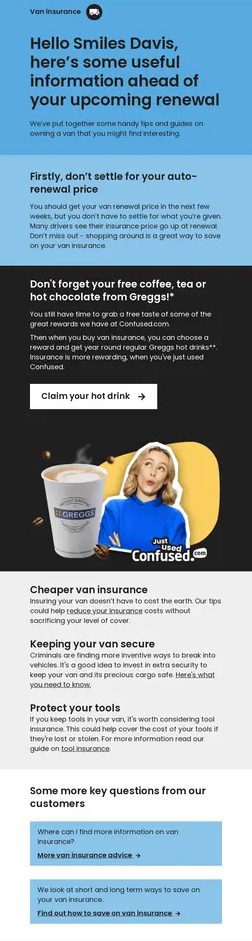
Key takeaways:
- Customer-first pricing: The email encourages users to review their renewal price, showing the brand is on their side.
- Clear incentive: A free drink reward motivates users to take action before renewal.
- Helpful content: Useful tips and articles remind users of the ongoing value of the service.
- Answers upfront: Common questions are addressed in the footer to reduce confusion and support requests.
8. Grammarly – Subscription renewal email example
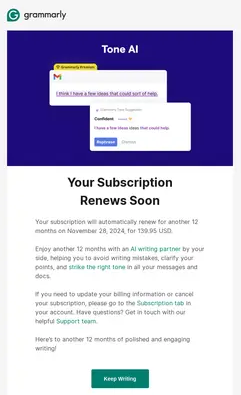
Key takeaways:
- Clear payment details: The email clearly shows the renewal date and price to avoid surprises.
- Value reminder: A large product image highlights what the user is paying for.
- Easy control: It explains how to update billing or cancel the subscription if needed.
- Future benefits: The copy focuses on the value the user will get in the next year.
9. Annual renewal email example from Amazon Prime
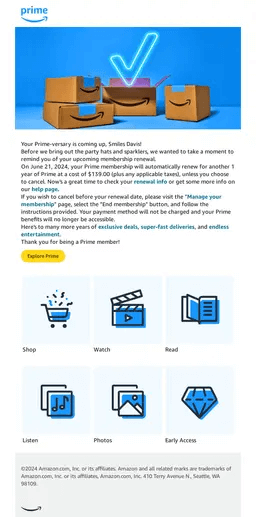
Key takeaways:
- Friendly, personal tone: The email celebrates the renewal as a milestone and uses the customer’s name to feel more personal.
- Full value reminder: Icons highlight all the benefits included in the subscription, not just one feature.
- Clear cost details: The renewal date and price are clearly shown, with an easy link to manage or cancel the membership.
- Future benefits: The copy focuses on the ongoing perks the user will continue to enjoy.
Subscription management email examples for upgrading or retaining services
10. Subscription upgrade email example from Slack
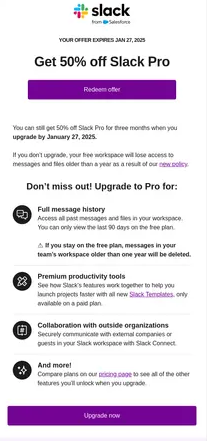
Key takeaways:
- Urgent deadline: The email clearly shows when the offer expires to push quick action.
- Clear problem solved: It explains what users lose on the free plan and why upgrading matters.
- Easy-to-scan benefits: Pro plan features are listed in simple bullet points for quick understanding.
- Strong CTAs: Upgrade buttons appear at the top and bottom to encourage clicks.
11. The final urgency upgrade offer (Ableton Live)
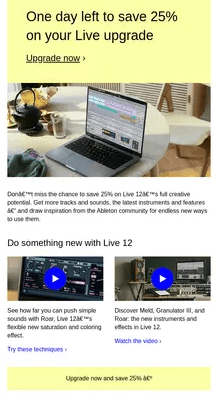
Key takeaways:
- Strong urgency: The headline makes it clear the discount ends today.
- Product in action: The main image shows the software being used, helping users visualize the value.
- Feature previews: Short videos demonstrate new features instead of just describing them.
- Clear savings: The 25% discount is repeated to reinforce the reason to act now.
12. Policy change notification with subscription upgrade option (Marco Polo)
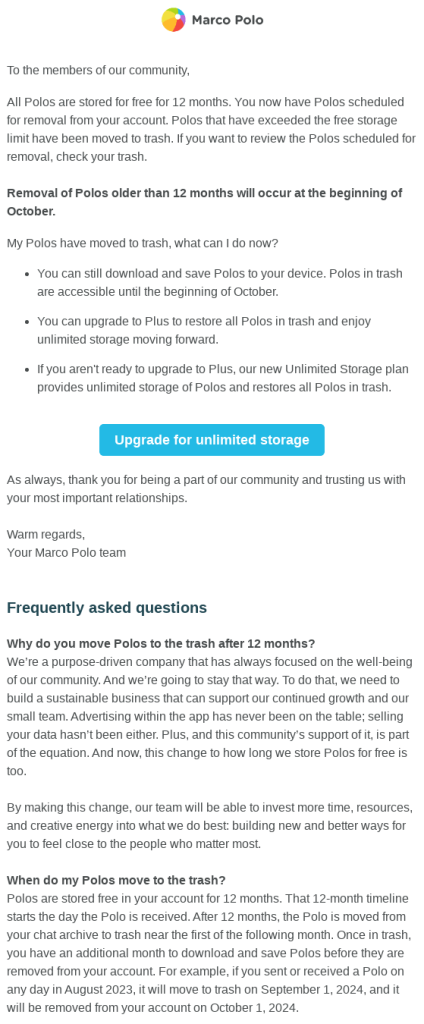
Key takeaways:
- Clear policy update: The email clearly explains when older Polos will be removed.
- Obvious solution: It shows that upgrading prevents data loss and adds unlimited storage.
- Helpful FAQs: Common questions are answered upfront to avoid confusion.
- Community angle: The change is explained as supporting the platform’s growth and team.
Subscription cancellation & winback email examples
13. The discounted trial winback offer to continue the subscription (Zapier)

Key takeaways:
- Low-cost trial: The offer gives access to the Pro plan for a very small price, making it easy to try.
- Clear feature upgrade: The email lists exactly what extra features users get by upgrading.
- Pricing clarity: It clearly explains what the plan will cost after the offer ends.
- Time-bound offer: An expiry date encourages users to decide and act quickly.
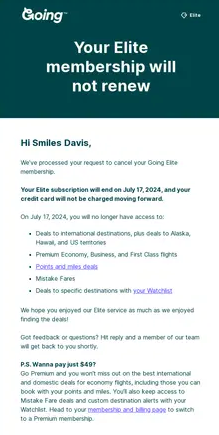
14. The subscription cancellation email with a downgrade offer
Key takeaways:
- Clear cancellation confirmation: The email clearly states the membership is canceled, and no further charges will be made.
- Shows what’s lost: It lists the benefits the user will lose to encourage reconsideration.
- Easy win-back offer: A simple, lower-cost option is offered in the P.S. to bring users back.
- Clear end date: The exact date access will end is clearly mentioned.
Related reading: 10 Order cancellation email templates + examples, tips & subjectlines
Free copy and paste subscription email templates for e-commerce marketing
Welcome your subscribers with a discount
Welcome to the Family! Here is your exclusive gift 🎁
Hi [Customer Name],
We are thrilled to welcome you to the [Your Brand] community! Thank you for subscribing to our updates. We’re excited to send you exclusive news about new products and early access to sales.
To celebrate your subscription, here is 15% off your first order. Use code WELCOME15 at checkout.
We believe in [Your Brand Mission/Value Proposition, e.g., clean ingredients, sustainable sourcing].
Dive in and discover your new favorite product.
[Shop Now CTA Button]
Happy shopping,
The [Your Brand] Team
The subscription renewal template(7 days out)
Don't miss your next box! Your [Box Name] subscription renews soon
Hello [Customer Name],
Your next [Box Name] subscription box is scheduled to automatically renew and ship in 7 days, on [Renewal Date], for $[Amount].
Get ready to receive this month's curated box of [Describe 1-2 items or the theme, e.g., five delicious coffees and a new ceramic mug]!
If you need to update your payment method or change your delivery address before the charge goes through, please visit your account dashboard immediately.
[Manage My Subscription CTA Button]
Thank you for being part of our community,
The [Your Brand] Team
Payment failed for your subscription email template
URGENT: Action Needed for your [Box Name] subscription
Dear [Customer Name],
We were unable to process your payment for your recent [Box Name] subscription renewal. Your next box is on hold and at risk of not shipping.
To ensure uninterrupted service and get your box on its way, please update your billing information immediately.
[Update My Payment Info CTA Button]
We tried charging the card ending in [Last 4 Digits] on [Attempt Date]. Please check your details and try again.
If the issue persists, contact our support team at [Support Email].
The post-cancellation winback offer subscription email template
Before you go: A special offer just for you.
Hi [Customer Name],
We’ve processed your cancellation request. Your access to our subscription benefits will end on [End Date]. We’re sad to see you go!
If you cancelled due to price, we have a solution. Reactivate your subscription right now and get 30% off your next two months of products. This offer is exclusive to you and expires in 48 hours.
Don’t miss out on getting your favourite items delivered right to your door.
[Reactivate My Subscription CTA Button]
We hope you'll reconsider!
The [Your Brand] Team
The one-year loyalty renewal (value reinforcement)
Happy Anniversary! Thank you for 1 Year of [Your Brand]
Hello [Customer Name],
We are celebrating your one-year subscription anniversary! Your annual membership will automatically renew on [Renewal Date] for $[Amount].
Over the last year, you’ve enjoyed benefits like [List 1-2 benefits, e.g., free shipping, early access to new collections] and saved [Calculate estimated savings, e.g., $50] compared to buying products individually.
We look forward to another year of delivering quality products to your home. No action is required if you wish to continue enjoying your benefits.
[View Account Benefits CTA Button]
Thank you for your loyalty,
The [Your Brand] Team
6 Best practices to write subscription emails
Here are the 6 best practices to ensure that your subscription emails are effective:
1. Use loss aversion, not gain framing
- Instead of highlighting what users get by renewing, show what they lose if they don’t.
- Clearly list the features, data, or progress they’ll lose access to. This motivates action more strongly than future promises.
2. Send pre-check emails before renewal
Don’t wait for payments to fail. Send a “service check” email 10–14 days before renewal, asking users to confirm payment details. This prevents involuntary churn and keeps access uninterrupted.
3. Use personalization
Avoid generic renewal emails. Segment users by behaviour and reference what they use most (e.g., “Since you rely on [Feature], make sure you keep access”).
This ensures your email is personalized and ties renewal directly to real value.
4. Sell time saved, not money saved
Discounts work, but efficiency works better. For B2B and SaaS, position renewal is time saved every month, not just dollars saved. Time feels more valuable than price.
5. Place win-back offers in the P.S.
In cancellation emails, confirm the cancellation first. Put downgrade or discount offers in the P.S. to respect the decision while offering a low-friction way back.
6. Design for one goal only
Each lifecycle email should serve one purpose:
- Welcome → Activation
- Renewal → Payment confirmation
Remove extra promotions or distractions to maximise conversions.
Set up your subscription email workflows effortlessly with Retainful’s custom triggers and automations
Wrap up!
Subscription emails play a critical role in guiding users across every stage of the customer lifecycle. When done right, they build trust, reduce churn, and drive consistent recurring revenue.
The subscription email examples in this guide show that high-performing subscription emails focus on clarity, value reinforcement, and a single clear action.
With the right email type and proven best practices, you can turn routine emails into powerful retention and conversion tools.
Also Read:
What is Targeted Email Marketing? Beginner’s Guide & Examples
30 Best email marketing examples that drive sales in 2025
9 Email Campaign Examples + How to Create
Frequently asked questions
A renewal email should clearly show the renewal date, charge amount, key benefits, and a link to manage billing.
Send renewal reminders 15–30 days before annual renewals and 7 days before monthly renewals.
Yes, billing and dunning emails reduce involuntary churn by prompting users to update failed or expired payments.
E-commerce welcome emails benefit from discounts, while SaaS welcome emails should focus on onboarding and activation.
Use a single-column layout, large, readable fonts, and touch-friendly CTAs linked to mobile-responsive pages.